Keyzapp and Reapit Integration
Using the Keyzapp integration with Reapit
Our integration with Reapit allows you to seamlessly sync your property data and supercharge your key management workflows.
This article explains how the integration works, what you can expect, and how to get set up depending on whether you're a new or existing Keyzapp customer.
What the integration does
The Keyzapp <> Reapit integration connects your Reapit property records directly to Keyzapp, enabling effortless property synchronisation:
- Your properties in Keyzapp are kept in sync with Reapit's database
- When properties are created or updated in Reapit, Keyzapp receives those updates automatically through a secure webhook
- You will still have the ability to manually sync properties with Reapit when required
When a key is signed in or out in Keyzapp - either on long-term issue or a regular sign-out - the information is instantly posted back into Reapit for reference on the Property Journal and Property Activity Feed:
Benefits for your agency
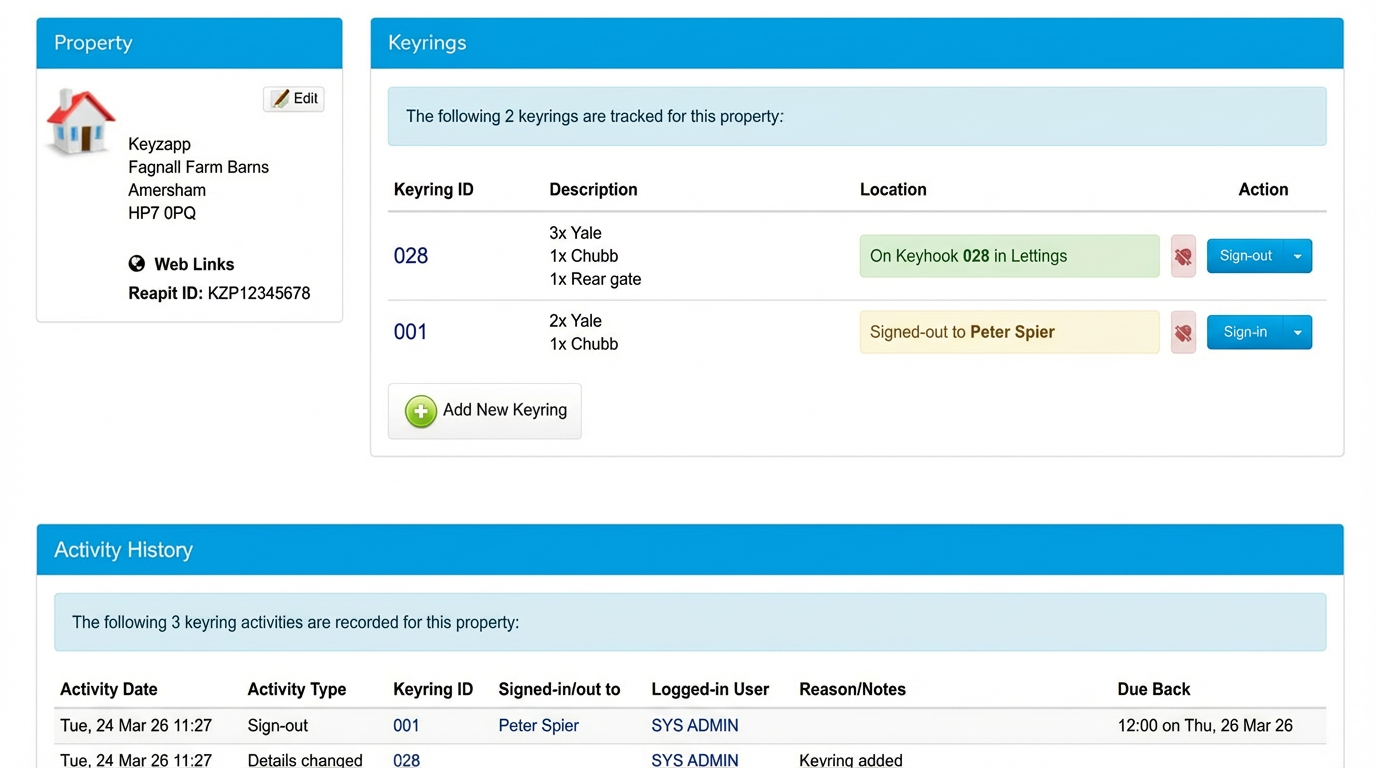
Use the Reapit reference to be confident that the property in Keyzapp has synced from Reapit. In Keyzapp, you can see:
- Keyrings associated with the property
- Who currently has each key
- A full audit history of key movements
In Reapit, you can easily see the key sign in and out information on the property journal and activity feed.
This integration makes it easy to check availability before booking contractors, assigning repairs or arranging access:
How to connect Keyzapp to Reapit
There are two setup paths depending on whether you are already using Keyzapp.
If you are already a Keyzapp customer
If you already manage keys in Keyzapp, it's important we link your existing properties correctly to their associated record in Reapit.
Before making any changes in Reapit, please contact us at support@keyzapp.com for a short consultation. If you wish to go ahead with the integration, we will:
- Review your property list in Keyzapp
- Align your Keyzapp data with Reapit to prevent duplicates
- Confirm the correct mapping
- Enable the integration safely
Once aligned, will give you everything you need to complete the Reapit configuration.
If you are new to Keyzapp
Set up is fairly quick - you'll just need to download the Keyzapp app from Reapit Foundations. In order to do this you may need admin permissions.
Downloading the app will directly alert the Keyzapp team; we will then be in touch with next steps!
What happens after setup?
After the integration is switched on:
- Reapit will send new and updated properties into Keyzapp
- You'll be able to jump from a Keyzapp property directly into the matching Reapit property record, as many customers already do today
- Your team will continue to use Keyzapp for issuing/returning keys, audits, reporting and more
- You'll be able to see in the journal of the property in Reapit when keys are moved around
Interested in this integration?
The Keyzapp team is happy to configure the integration for you or walk you through the workflow. Please reach out to support@keyzapp.com or contact your onboarding specialist for further assistance.
Related Articles
Keyzapp and Street Integration
Using the Keyzapp integration with Street.co.uk The Keyzapp integration with Street allows you to seamlessly synchronise your property data and supercharge your key management workflows. This article explains how the integration works, what you can ...Keyzapp and Fixflo Integration
Using the Keyzapp integration with Fixflo Our integration with Fixflo makes it simple to bring property information from Keyzapp into your Fixflo system and to access real-time key status from within your maintenance workflow. If your team manages ...Keyzapp and SME Integration
Using the Keyzapp integration with SME Our integration with SME allows you to seamlessly sync your property data and supercharge your key management workflows. This article explains how the integration works, what you can expect, and how to get set ...Keyzapp and iamproperty Integration
Using the Keyzapp integration with iamproperty Our integration with iamproperty (formerly OpenView and Gemini) allows you to seamlessly sync your property data and supercharge your key management workflows. This article explains how the integration ...Keyzapp and MRI Integration
Using the Keyzapp integration with MRI Our integration with MRI (Sales & Lettings) allows you to seamlessly sync your property data and supercharge your key management workflows. This article explains how the integration works, what you can expect, ...
Recent Articles
What is a Keyzapp Kiosk?
What is a Kiosk? A kiosk is a physical device that allows key controllers to access the Keyzapp software and provide a workflow of signing keys in- and out to streamline key management processes. The device is provisioned so that its sole purpose is ...Using a Dropbox Kiosk
What is a Dropbox Kiosk? A dropbox kiosk is a physical location - accompanied by a Keyzapp Kiosk - that allows key-holders such as staff, contractors etc to quickly and efficiently drop keys back to your office in a secure manner. This functionality ...Merging Properties
There may be occasions when - due to human error - you have a duplicated property within your Keyzapp account. This is easy to rectify using our merge functionality. To avoid further confusion and possible duplication of keys, we recommend that you ...View My Active Properties
How do I view my active properties? An active property is any property that has one or more active key rings against it, regardless of how many archived keys it may also have. The number of active properties in your account often also determines your ...Keyzapp and iamproperty Integration
Using the Keyzapp integration with iamproperty Our integration with iamproperty (formerly OpenView and Gemini) allows you to seamlessly sync your property data and supercharge your key management workflows. This article explains how the integration ...